Add extra questions to your website contact form, alongside name, email, phone and message. Visitors' answers, and any files they upload, arrive with the enquiry.
Who can do this: owners and admins. Plan: Crew, Business or Pro. On the Free plan the section shows an upgrade link instead.
Before you start: set up the form itself. See Put a contact form on your website.
Add a question
- Go to Settings > Website Integration and open Your Own Questions.
- Click Add question.
- Type the Question, for example What is your postcode?
- Pick an Answer type.
- Optionally add a Placeholder (faint text inside the box) and Help text (shown under the question), and tick Required.
- Click Save question.
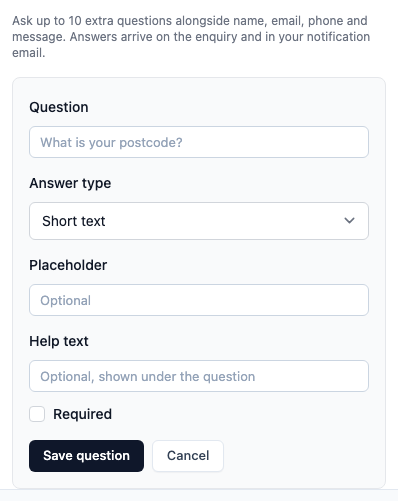
The question is saved straight away and appears in the Form Preview. You do not need to click Save Form Configuration. A form can have up to 10 questions.
Answer types
- Short text, Long text, Number and Date.
- Dropdown (pick one), Radio buttons (pick one) and Checkboxes (pick any) - click Add choice for each option, up to 25.
- Single tick box (yes/no).
- File upload - set Maximum files (up to 10) and tick the Accepted file types: images, PDF, Word and Excel. Each file can be up to 25 MB. A form can have up to three file upload questions, and one enquiry can carry up to 10 files.
Change or remove a question
Click Edit or Remove next to the question. Removing asks you to confirm. Answers already received on enquiries are kept.
Make sure your website shows the questions
Questions appear on your website the next time the page loads, as long as your website has the current version of the form's code. If it has an older version, an amber notice at the top of Website Integration reads Your website is running an older version of this form. Click Show me the code and replace the code on your website once. See Put a contact form on your website.
Where the answers appear
- On the enquiry, under Form responses. Uploaded files are attached to the enquiry.
- In the notification email sent to your company email address.
If a visitor's file cannot be accepted, the enquiry still arrives, with a note saying how many files could not be attached.
If the account moves to the Free plan, your questions stop showing on your website but are kept. They return when you move back to a paid plan.
Related articles
- Put a contact form on your website - design the form and add it to your site
- The contact form on your website is not working - questions not showing, or enquiries not arriving
- Add and manage contacts - the contacts website enquiries create