Ask for annual leave and see whether it has been approved. An owner, admin or office staff member on your account approves or denies your request.
Who can do this: any member of staff, for themselves.
Requests are for annual leave, in whole days. Sickness and other absence is recorded for you by an owner, admin or office staff member.
Request time off in the mobile app
- Tap Profile in the bottom bar, then Absence.
- Tap Request Time Off.
- Pick the Start Date and End Date. For a single day, use the same date in both.
- Add a description if you want to give a reason.
- Tap Submit Request.
Request time off on the web
- Click your avatar in the top right and choose Your Profile.
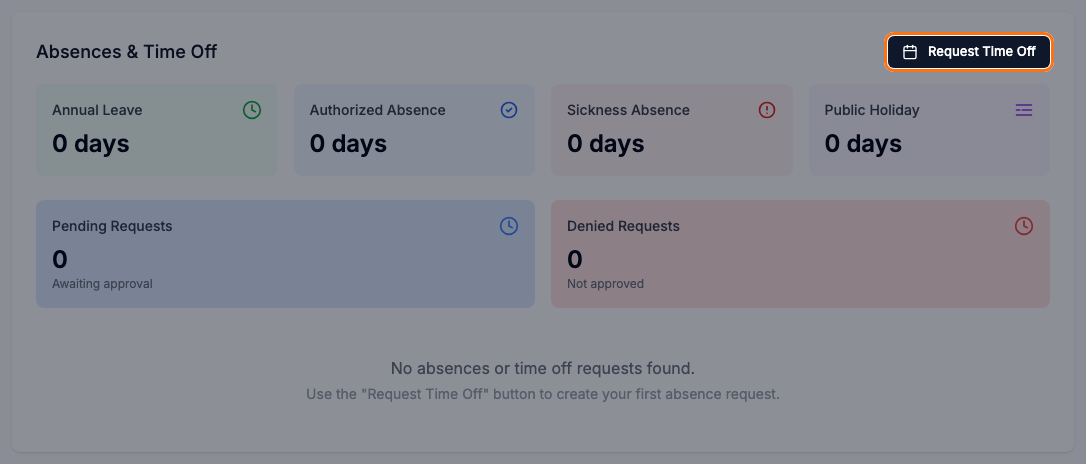
- In Absences & Time Off, click Request Time Off.
- Set the Start Date and End Date.
- Add a Description if you want to give a reason.
- Click Submit Request.
Check on a request
Your request is listed under Pending Requests until someone approves or denies it. Once approved, it is added to your Annual Leave total. A denied request is listed under Denied Requests.
Your totals count working days only, so days you do not normally work and recorded bank holidays are not included. See Your Account's Working Hours.
To change or cancel a request, ask an owner, admin or office staff member.
Related articles
- Record and Approve Staff Absence - recording, approving and denying absence
- Your Account's Working Hours - which days count as working days