Skip to the product
Built in West Sussex, for UK trades

Job management software for UK trades and construction

Enquiries, quotes, scheduling, time on site, job costs and invoices. One system for the whole business, not a folder for each part of it.

Free plan, no card needed14-day trial on the paid plansSet up in about 5 minutesiOS and Android
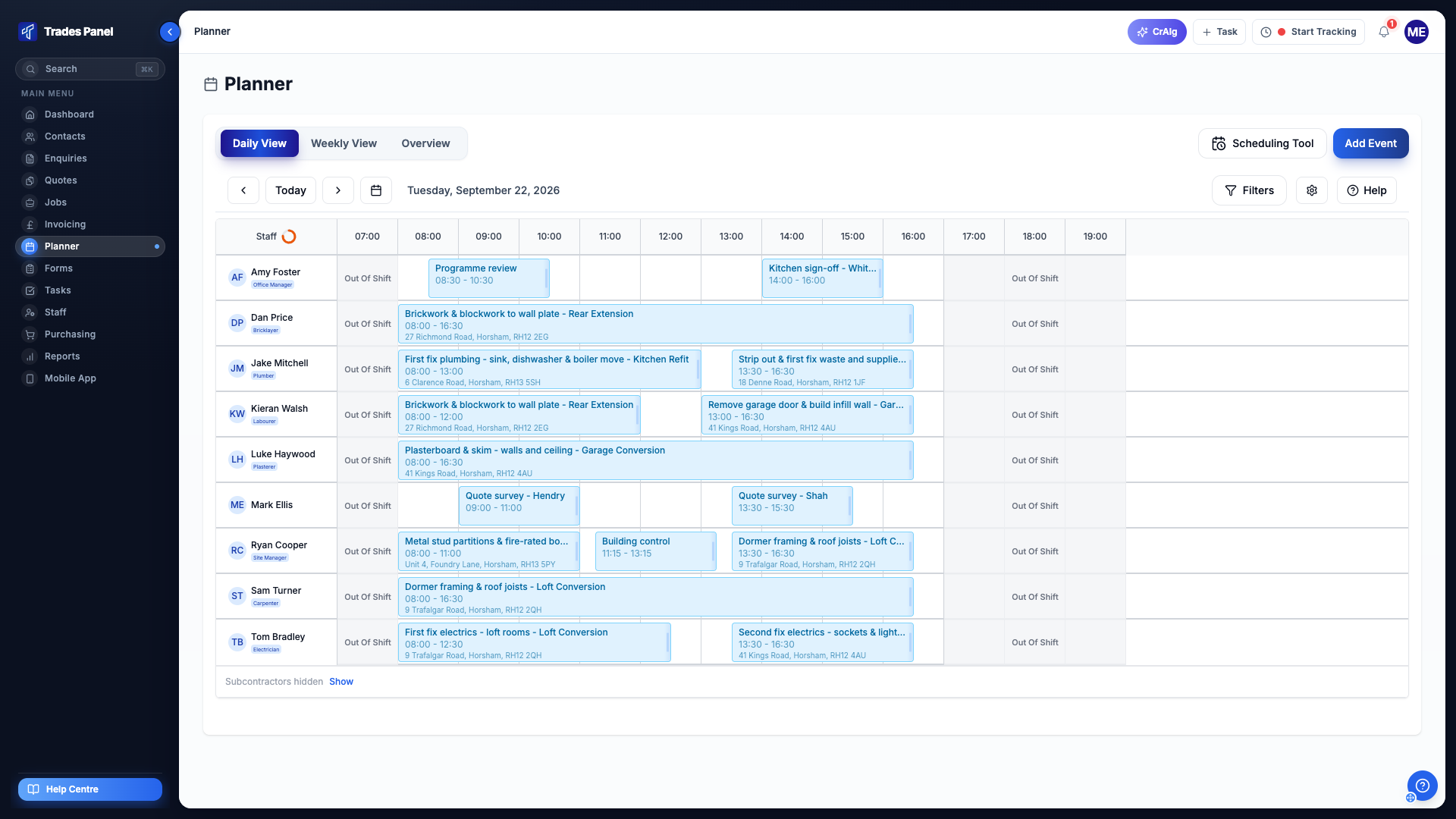
The Trades Panel planner in daily view: nine staff listed down the left with their trades, and the jobs they are booked onto across the working day.
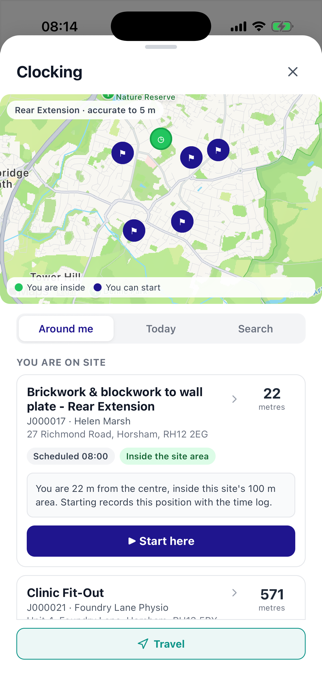
The Trades Panel mobile app clocking screen: a map of nearby sites, then You are on site with the rear extension job 22 metres away, inside the site area, and a Start here button.
What it does

One system for the whole business.

Enquiries and quotes long before there is a job. Scheduling, time on site and job costs while it runs. Variations, forms and invoicing as it lands. In most firms that is a folder, a WhatsApp thread, a diary, a pile of timesheets, a supplier email chain and an invoice book.

Enquiries and pipeline

The form on your website creates the contact and the enquiry. Nobody retypes a phone number.

Quoting and estimating

Sections and line items, each with materials, labour and plant, each with its own margin.

Scheduling

Book staff and subcontractors onto work, and move it when plans change. Day, week and overview.

Time tracking

Clock in on site, and on a paid plan inside a geofence you set around the address.

Job finance

Budget against actual by category, and the projected margin while the job is still running.

Variations

Price the change, get it approved, apply it. The job total moves and stays moved.

Forms and checklists

Built in the office, filled on site, with photos, timestamps and the client's signature.

Invoicing

Split the job value into stage payments and raise each one when the stage actually lands.

Documents and notes

The site thread and the plans, on the job, not in a WhatsApp group.

Quoting

Quote from your own price book,
with margin on every line.

Build a quote in sections and line items. Each line carries materials, labour and plant, each with its own margin, and presets come from your own price book. Accept it and it becomes the job.

  • Sections and line items
  • Materials, labour and plant, each with its own margin
  • Price-book presets, copied onto the line, so changing a rate later does not move a quote you have already sent
  • Bulk margin across a whole section
  • Accepted quote converts straight to a job
  • Send the quote, or download the PDF

Already estimate somewhere else? CrAIg reads a professional QS estimate, a Price A Job or HBXL EstimatorXpress export, or a tender plot list, and builds the quote from it.

Q000214Kitchen extensionAccepted
Quote itemSell
Groundworks£8,400
Site clearance and reduced dig£3,150
Materials£420
Labour£1,910
Plant£820
Hardcore sub-base (Type 1)M · L · P£5,250
Shell & roof£15,900
First fix£11,250
Second fix & finish£11,250
Total ex VAT£46,800
Sent TueAccepted ThuConverted to J000186
Scheduling and time

Book the week.
Timesheets build themselves from clock-ins.

Book staff and subcontractors onto work, and move it when plans change. Day, week and overview. Everyone sees their own schedule in the app, and staff clock in against the job from their phone, so the timesheet is already written by Friday.

  • Day, week and overview planner
  • Staff and subcontractor scheduling
  • Clock in and out from the app, against the job
  • Geofenced clock-in, radius set per site · paid plans
  • Timesheets built from clock-ins
  • Saved clock-in locations for yards and depots

The location check runs at clock-in and clock-out, against the job address or one of your saved clock-in locations.

TimesheetsTue 14 Apr · J000186
Dan Reeves07:42 - 15:307h 48m
Mike Osei08:06 - 15:187h 12m
Priya Shah-0h 00m
Inside the 100 m geofence at clock-in
Labour to date£11,850
Job costs and invoicing

See the margin
while the job is still running.

Budget against actual by category, with the projected margin updating as costs land rather than at the end. Price a change as a variation, get it approved, apply it, and the job total moves with it. Split the value into stage payments and raise each invoice from the schedule when the stage is actually done.

  • Budget vs actual by category, with drill-down
  • Variations: priced, approved, then applied
  • Staged invoicing from a payment schedule
  • Projected margin while the job runs
  • Sales and purchase invoices
  • Bulk CSV export over any date range
Change ordersApplied
Bifold door upgrade+£1,850

Swap 2.4 m French doors for a 3-panel aluminium bifold. Extra lintel bearing, revised threshold detail.

Supply and fit 3-panel bifold£1,560
Materials£1,180
Labour£300
Plant£80
Revised lintel and thresholdM · L£290
Job total before£46,800
Job total now£48,650
Payment scheduleJ000186 · £48,650
Deposit · 30%Invoiced & paid£14,040
First fix complete · 40%Invoiced & paid£18,720
Bifold variationInvoice sent£1,850
Completion · 30%Raise when done£14,040

£34,610 invoiced of £48,650

Mobile

The office in a browser.
The site team on their phone.

Everything the team needs on site runs on iOS and Android: today's schedule, the job and its line items, notes and photos, forms, and the clock. Forms are built in the office and filled on site, fully customisable to require photos, timestamps, signatures and more, captured on the the mobile app.

  • iOS and Android, one app
  • Today's schedule and the job's line items
  • Notes and photos straight onto the job
  • Forms with photos, timestamps and signature
  • Clock in and out on site
  • Works for office staff and field staff

One app for office staff and field staff, rather than an office system and a separate site app. Everyone sees their own schedule.

Today · Tue 14 Apr

Kitchen extension

14 Ashdown Road, Horsham

Clocked in at 07:42

7:48 on site

Inside the 100 m geofence
Clock out
First fix carpentryIn progress
Pre-start checklistSigned
Add a note or photoTap
On Trustpilot

Reviews from firms
running on it.

"Trades Panel is without doubt one of the best software packages I have used in the joinery and construction industry."

"From the outset, the system has proven to be intuitive, reliable, and extremely well thought through for day-to-day operational use. If we contact them with a query or issue, they deal with it immediately and see it through to resolution."

Daniel Whittington
Tekton Joinery & Construction · 27 February 2026

"Best trade software I've had for years"

"I've had about 3 different trade softwares over the years and there was always something missing from them that my business needed. It's brilliant, even my staff love it. The founder William has been so helpful, if there was an issue or if I was stuck he replies the same day."

Anthony Williams
Trade business owner · 29 July 2026
Read the reviews on Trustpilot
Pricing

Start free.
Pay when it pays for itself.

Free

£0

No card needed

  • 3 User seats
  • 5 jobs
  • 5 quotes
  • 1 enquiry pipeline
  • No CrAIg credits
  • Job Finance
  • Documents on jobs
  • Geofenced clock-in, radius set per site
  • Staff clock-in and timesheets
  • Staff and subcontractor scheduling
  • iOS and Android app

Crew

£54.99/mo

or £549.90/yr, 2 months free · ex VAT

  • 3 User seats
  • Unlimited jobs
  • Unlimited quotes
  • 3 enquiry pipelines
  • 100 CrAIg credits a month
  • Job Finance
  • Documents on jobs
  • Geofenced clock-in, radius set per site
  • Staff clock-in and timesheets
  • Staff and subcontractor scheduling
  • iOS and Android app
Our pick

Business

£89.99/mo

or £899.90/yr, 2 months free · ex VAT

  • 10 User seats
  • Unlimited jobs
  • Unlimited quotes
  • 3 enquiry pipelines
  • 100 CrAIg credits a month
  • Job Finance
  • Documents on jobs
  • Geofenced clock-in, radius set per site
  • Staff clock-in and timesheets
  • Staff and subcontractor scheduling
  • iOS and Android app

Pro

£159.99/mo

or £1599.90/yr, 2 months free · ex VAT

  • Unlimited User seats
  • Unlimited jobs
  • Unlimited quotes
  • Unlimited enquiry pipelines
  • 100 CrAIg credits a month
  • Job Finance
  • Documents on jobs
  • Geofenced clock-in, radius set per site
  • Staff clock-in and timesheets
  • Staff and subcontractor scheduling
  • iOS and Android app
Free needs no card. Every paid plan starts with a 14-day trial. Change plan or cancel at any time.
Straight answers

The questions we
actually get asked.

Do I have to put a card in to try it?

No. The Free plan takes no card and has no trial clock - 5 jobs, 5 quotes and 3 User seats, for as long as you like. If you want a paid plan, the 14-day trial does take a card, nothing is charged until it ends, and you can cancel at any point in it and pay nothing.

Does it connect to my accounts software?

Not directly, not yet. What you can do today is bulk export your sales and purchase invoices to CSV over any date range and upload that into your accounts software, and raise, send or download invoices from Trades Panel.

I already estimate in something else. Do I have to start again?

No. Our AI assistant, CrAIg, reads a professional QS estimate as a PDF, a Price A Job or HBXL EstimatorXpress export, or a tender plot list, and turns it into a Trades Panel quote you can edit. That uses CrAIg credits, and you get 100 a month on a paid plan.

Is it built for my trade?

Trades Panel works for pretty much any trade - builders, joiners, electricians, plumbers, roofers, groundworkers, fit-out and maintenance teams.

Do I have to start every job with an enquiry and a quote?

No. You can raise a job directly, or write a quote with no enquiry behind it. The stages exist because most work moves through them, not because the system forces you down a funnel.

Will invoices go out on their own?

Deliberately not. You raise each invoice from its scheduled payment when the stage is actually done, then send it from Trades Panel or download the PDF. Jobs slip, and nobody wants an invoice firing off on a date that stopped being true three weeks ago.

Put a live job on it
and see.

Take the job you are running now, put it in, and watch where everything lands. If it does not make the week easier, you have lost twenty minutes and no money.

Free plan, no card neededSet up in about 5 minutesBuilt in West Sussex

Start your account

Two fields here, then the rest takes about two minutes.

No card needed. Upgrade whenever you are ready.