Troubleshooting for Labour, Material and Plant Budgets
A job's Labour Budget, Material Budget and Plant Budget pages count approved costs only, sorted by each purchase invoice's settings. Work through the causes below in order.
Cause 1: the bill is waiting for approval
Bills uploaded by field staff from the mobile app wait for approval, and do not count until they are approved.
How to tell: on the job's Purchase Invoices page, the bill has an amber Pending badge. Click Pending approval to list only these.
Fix: click Review on the bill, check it, and click Approve Invoice.
Cause 2: the Invoice Type is wrong
Invoice Type decides the budget: Materials counts towards the Material Budget, Plant & Equipment towards the Plant Budget, and Subcontracting towards the Labour Budget. A new bill starts on Materials, so a subcontractor's bill saved without changing it counts as materials.
How to tell: on the Purchase Invoices page, the type shows under the badge in each bill's Type column.
Fix: open the bill, click Edit, change Invoice Type, and click Update Invoice.
Cause 3: the lines are not matched to a job item
A line with no job item still counts towards the page's Actual Cost, but sits in Misc Costs at the bottom of the table rather than against the job item it paid for. That job item then shows £0.00 actual.
How to tell: open Misc Costs on the budget page. Each entry names the purchase invoice it came from. On the bill itself, lines with no job item read No job item.
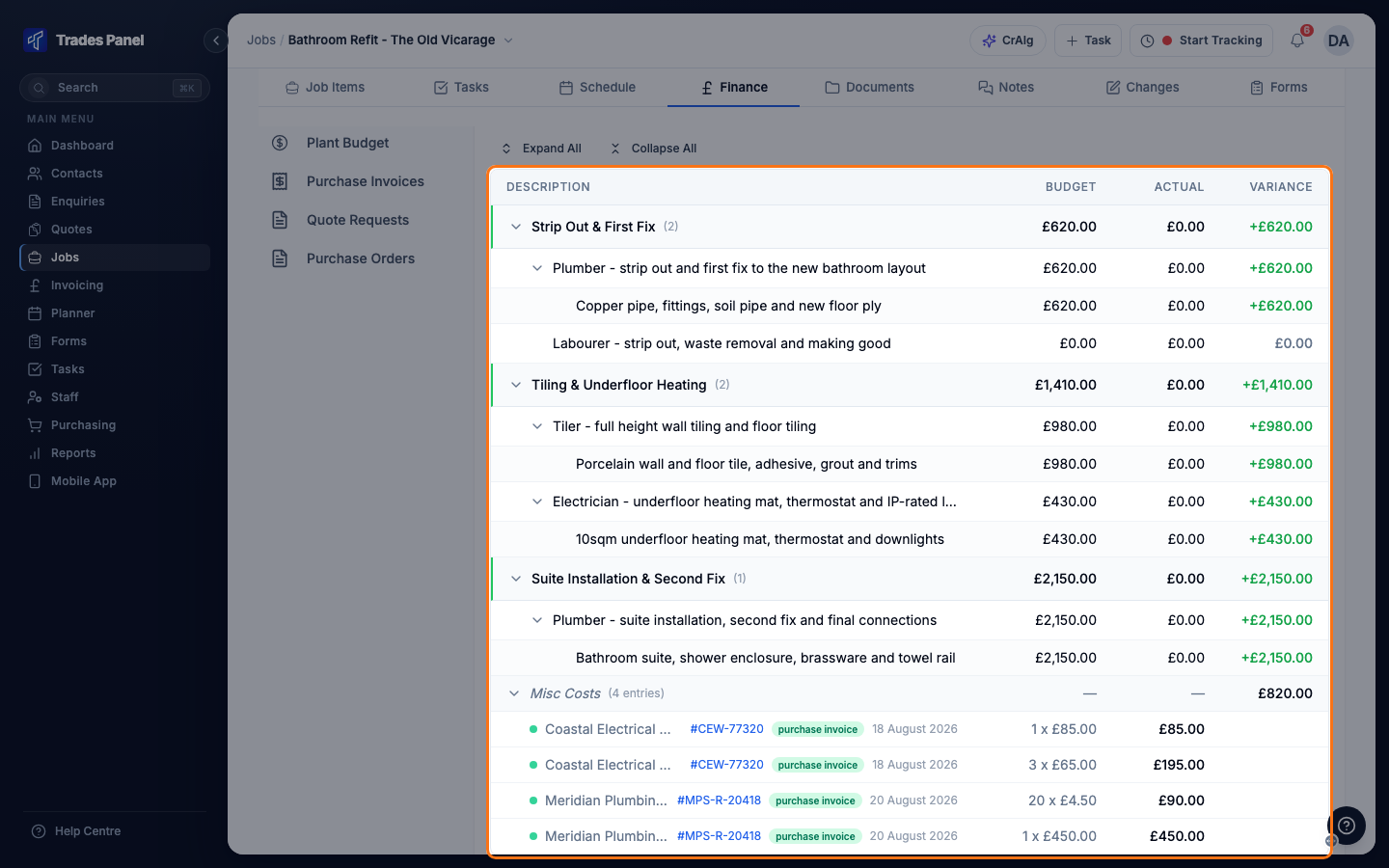
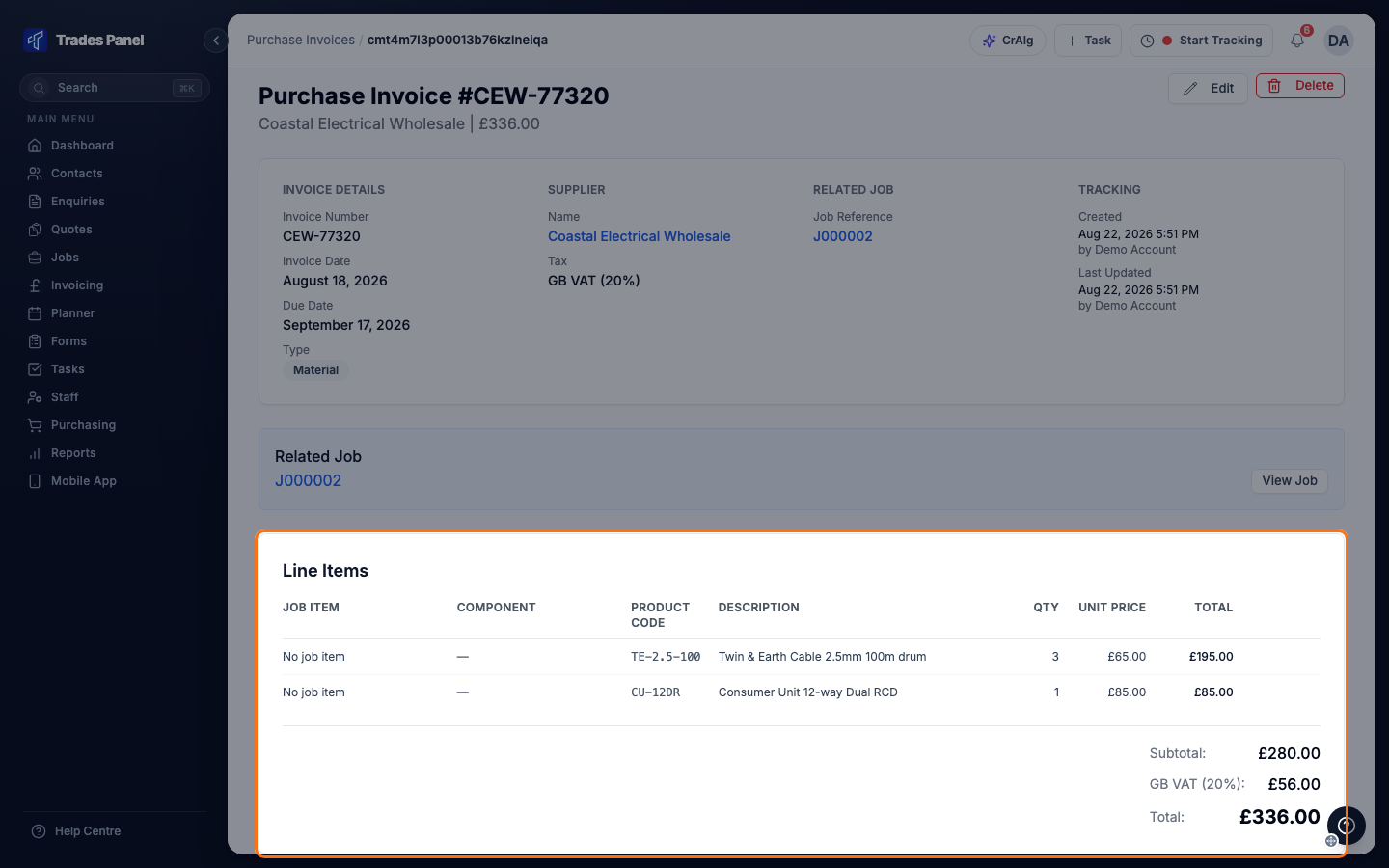
Fix: open the bill, click Edit, choose the Job Item and Component on each line, and click Update Invoice.
A line matched to a job item but not to a Component counts against that job item, under its own Misc Costs row.
Cause 4: the bill is not linked to the job
A bill with no job does not appear on any job's budget pages.
How to tell: the bill is on the Purchase Invoices tab in Purchasing, but not on the job's Purchase Invoices page. Its Job column reads N/A.
Fix: open the bill, click Edit, choose the job under Link to Job, set the job item on each line, and click Update Invoice.
Cause 5: a member of staff has no pay rate
Staff time on the job counts towards the Labour Budget at each person's pay rate. Time logged by someone with no rate counts as £0.00.
How to tell: the Labour Budget page shows a warning naming who has no pay rate.
Fix: set an hourly rate, day rate or annual salary on their staff profile. See Set a Staff Member's Pay Rate.
Still stuck?
Contact Trades Panel support.
Related articles
- Labour, Material and Plant Budgets - what each budget page shows and where its figures come from
- Record a Supplier or Subcontractor Bill
- adding, approving and editing bills
- Let CrAIg Read an Invoice PDF - matching uploaded invoice lines to job items
- Build a Job Up: Job Items and Line Items
- the job items and costs that bills are matched to
- Set a Staff Member's Pay Rate - when labour is missing because someone has no rate